Many clients mention Graphic Overlays and Deadfronts in their customization requests for industrial control, automotive electronics and other scenarios, but often confuse their process logic and application scenarios. Combining common demands in the overseas market (such as customization of industrial equipment control panels and automotive dashboards), this article will explain the core definitions, process characteristics, key differences and typical applications of these two panel-type customized products in plain language, helping you quickly master key industry knowledge.
I. Core Definitions: What Are They?
Graphic Overlays: Equivalent to a functional protective film on the product surface, directly attached to equipment panels, serving the triple functions of decoration, protection and functional marking.
Deadfronts: An upgraded functional version of Graphic Overlays, with the core feature of hiding patterns when unlit and displaying information when lit, focusing on high-end visual sense and scenario-based functions.
In essence, both are film/board products attached to equipment surfaces, with the core difference lying in the light-transmitting display logic and visual effect. Technologically, they belong to a combination of printing + material forming, rather than metal processing technologies (completely different from the etching and wire drawing processes we discussed earlier).
II. Graphic Overlays: Processes, Materials and Advantages
1. Core Positioning
As the first layer of protection + carrier of functional markings for equipment panels, they are commonly used in industrial control buttons, home appliance control panels, medical device operation areas, etc. They not only protect internal components but also realize visual operation guidance through printed patterns.
2. Key Processes and Materials
Core Materials: Mainly polycarbonate, polyester and vinyl — polycarbonate has high impact resistance (suitable for industrial scenarios), polyester is resistant to chemical corrosion and high temperature (suitable for outdoor/high-temperature environments), and vinyl has good flexibility (suitable for curved products).
Printing Processes: Screen printing or digital printing, capable of realizing bright, high-precision pattern/text printing (such as button markings, operation instructions and brand logos).
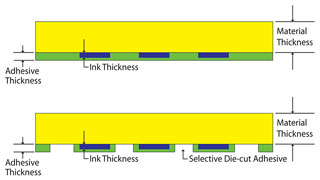
Core Processing Details:
3. Core Advantages
III. Deadfronts: Processes, Core Effects and Advantages
1. Core Positioning
As a high-end panel featuring visual concealment + on-demand display, they are commonly used in automotive dashboards, high-end home appliance control panels and precision industrial equipment, focusing on the high-end sense of "neat and unified appearance when not in use, and precise display when in use".
2. Key Processes and Materials
The basic materials are the same as those of Graphic Overlays (mainly polycarbonate/polyester), with the core difference in the treatment of light-transmitting areas:
The printing and lamination processes are the same as those of Graphic Overlays, but with higher requirements for light transmission uniformity — ensuring clear patterns when lit and complete concealment without light leakage or uneven light transmission when unlit.
3. Core Effects and Advantages
IV. Key Differences Between Graphic Overlays and Deadfronts (Comparison Table)
| Comparison Dimension | Graphic Overlays | Deadfronts |
| Core Visual Effect | Patterns/markings are always visible; light-transmitting windows display light directly | Patterns are hidden when unlit, and markings/light are displayed only when lit |
| Key Design | Clear printed patterns + transparent/translucent light-transmitting windows | Translucent black/red light-transmitting areas + unified overall panel appearance |
| Core Function | Protection + visual operation guidance | Protection + scenario-based information display (revealed on demand) |
| Applicable Scenarios | Industrial control buttons, ordinary home appliance control panels, medical device operation areas | Automotive dashboards, high-end home appliance control panels, precision industrial equipment |
| Process Difficulties | Printing precision, accurate alignment of light-transmitting windows with LEDs | Light transmission uniformity (no shadows when lit), concealment effect (no light leakage when unlit) |
V. Summary: How to Choose?
Choose Graphic Overlays if you need basic protection + clear markings (e.g., ordinary control panels of industrial equipment and operation panels of exported home appliances) — they offer a high cost performance and meet core demands.
Choose Deadfronts if you pursue high-end visual sense + on-demand display (e.g., dashboards of exported automobiles and control panels of high-end industrial equipment) — they can enhance the overall texture of products and meet the demands of the high-end overseas market.
Both processes belong to panel-type customized products, which mainly rely on material selection + printing precision + lamination technology, and are completely different from the etching and wire drawing processes of metal nameplates. They are mainly suitable for the surface functional decoration demands in electronics, industry, automotive and other fields. For customized requests of such products from clients, we can accurately match solutions by focusing on communication about materials (e.g., whether chemical corrosion and UV resistance are needed), light-transmitting demands (e.g., whether concealment is needed) and installation scenarios (e.g., curved/flat surface, high temperature/normal temperature).
 EN
EN